
Obtaining a DOFA Report

Obtaining a DOFA Report (Rep Additions)
What DOFA means, why it matters, and how to store the DOFA report in Zoho as non-negotiable evidence
What is DOFA (in FAIS terms)?
DOFA stands for the representative’s Date of First Appointment. In a FAIS environment, DOFA matters because many Fit & Proper requirements are linked to when the rep first started rendering financial services. The DOFA helps us determine whether a rep is still within the allowed timeframe to complete key competence requirements, and whether the rep should be operating under supervision.
Why DOFA is important
- Supervision decisions: DOFA helps determine whether supervision is required and why
- Competence timelines: supports checking “within allowed time” vs “overdue”
- Consistency: gives a single reliable reference point for internal decisions
- Defensible outcomes: protects the client and Nkwali during monitoring or audits
- Evidence standard: proves we did the check, not just “ticked a box”
Lesson Audio
Play the audio while you read through the lesson.
SOP Download (Required Reading)
Download and follow the official SOP. This is the step-by-step method for obtaining a DOFA report. Keep it open while you work.
How DOFA impacts Fit & Proper (the compliance logic)
This is what you must understand to apply the rules confidently and answer client questions.
Concept 1 — DOFA anchors competence “time allowed” decisions›
Many Fit & Proper competence requirements are linked to whether the rep is still within the allowed timeframe. The DOFA is what anchors that timeframe because it represents when the rep’s journey started.
Concept 2 — DOFA supports the supervision decision (and the supervision email trigger)›
When the evidence shows the rep is not yet fully competent, DOFA helps explain why supervision applies. This is also why clients may receive a supervision instruction email after the rep addition process is completed internally.
Concept 3 — DOFA is part of a defensible audit trail (not optional admin)›
When FSCA/insurers/compliance monitoring reviews a rep addition, they want to see evidence that the FSP (and its compliance support) confirmed competence and supervision status properly. The DOFA report is part of that proof.
Zoho evidence rule: upload the DOFA report (NON-NEGOTIABLE)
This is the exact section where DOFA must be uploaded as evidence.
Step — Upload the DOFA report in the dedicated Zoho section›
Once you have obtained the DOFA report, you must upload it in the Zoho section created for DOFA evidence. This is mandatory for every rep addition.
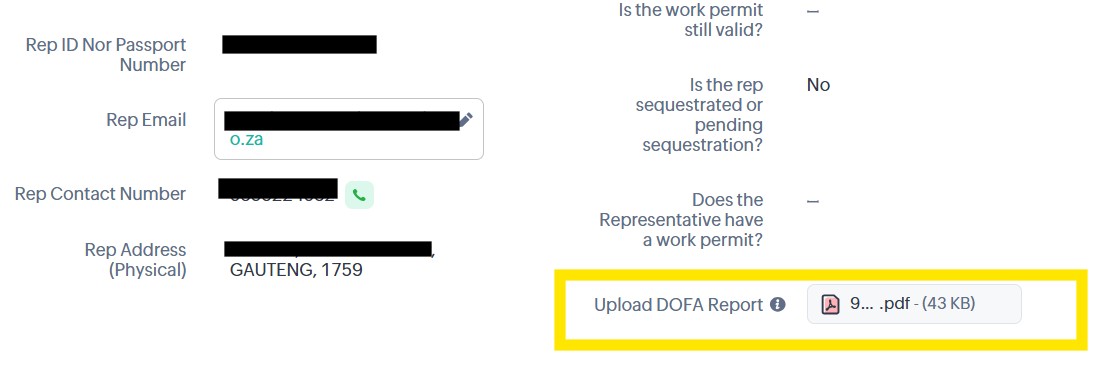
- Every rep addition record must contain the DOFA report upload.
- If the rep addition is “complete” but DOFA is missing, it is not truly complete.
- This is the evidence we rely on for supervision and fit & proper decisions.
Common mistakes (and what to do instead)›
Correct action: Always retrieve the official DOFA report and upload it.
Correct action: Upload into Zoho immediately. Evidence must live in the record.
Correct action: DOFA upload is part of the workflow, not an afterthought. Do it before moving on.
Play & Learn (quick decision simulation)
Choose the best response when DOFA evidence is missing.
Scenario
You open a rep addition record and notice the rep has been added, but the DOFA report is not uploaded in Zoho. What should you do?