
Rep Additions — Supervision Confirmation

Supervision Confirmation (Rep Additions)
Why we never rely on the JotForm answer — we confirm supervision using Fit & Proper evidence
The rule: the client’s selection is not the source of truth
In the JotForm, a client may indicate whether a representative is under supervision or not under supervision. As a compliance practice, we cannot rely on the client’s selection because we are expected to understand and apply the Fit & Proper requirements. Our job is to confirm the status by checking the representative’s competence evidence and applying the supervision rules correctly.
What you must achieve
- Confirm the rep’s competence status using evidence (DOFA + RE + qualification)
- Capture the correct internal field: “Confirm supervision status of rep”
- Complete the rep addition record fully before submission
- Understand what the client email means (and why it is sent)
- Know the core supervision obligations well enough to answer client questions
Step-by-step (Follow this order every time)
Open each step. This is the official “confirm supervision status” workflow for rep additions.
Step 1 — Start with evidence (not the JotForm selection)›
Even if the client selected “Not under supervision” on the JotForm, you must still do a Fit & Proper check. Your decision is based on whether the rep is competent (RE + qualification + other competence items within the allowed timeframes).
Evidence you must obtain / verify
Step 2 — Apply the Fit & Proper logic to decide “under supervision” vs “not”›
Supervision is generally required when the representative is not yet fully competent (for example: still within the allowed time to complete RE and/or qualifications, or still developing competence in specific product categories). Your job is to apply the rules to the evidence you checked.
- If the rep is fully competent for the role/class of business (and evidence supports it) → capture Not under supervision.
- If the rep is not yet fully competent (e.g., RE and/or qualification outstanding within allowed timeframe) → capture Under supervision.
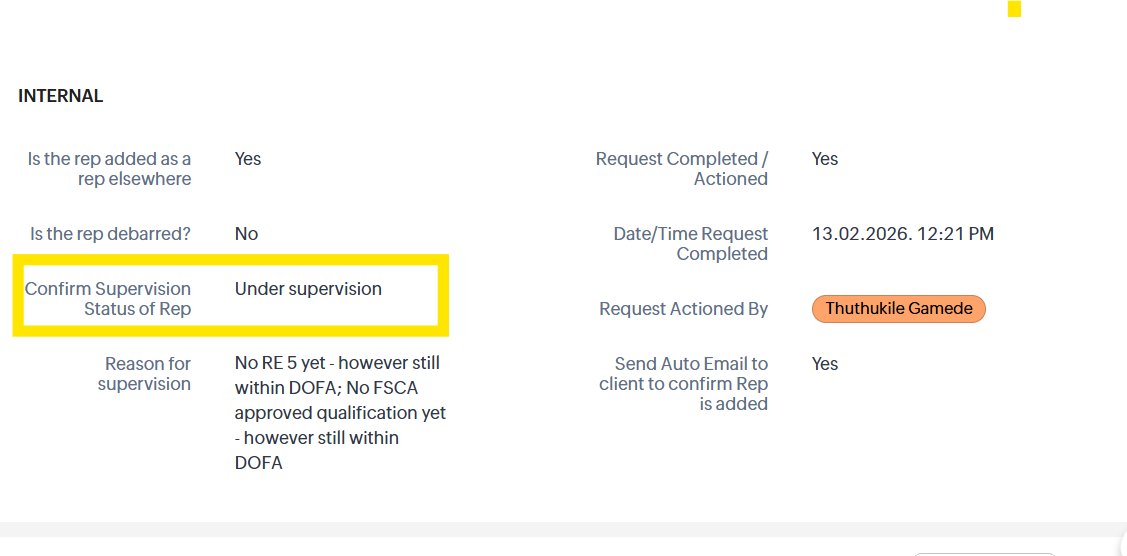
Step 3 — Capture the internal field: “Confirm supervision status of rep” (Screenshot 1)›
Once your Fit & Proper confirmation is done, update the internal section: “Confirm supervision status of rep” and select the correct status (as shown below).
Step 4 — Complete the rep addition record fully (then submit / proceed)›
After capturing the correct supervision status and completing all other internal sections, proceed with the rep addition workflow. The record must be complete and audit-ready before submission.
Before you proceed, confirm:
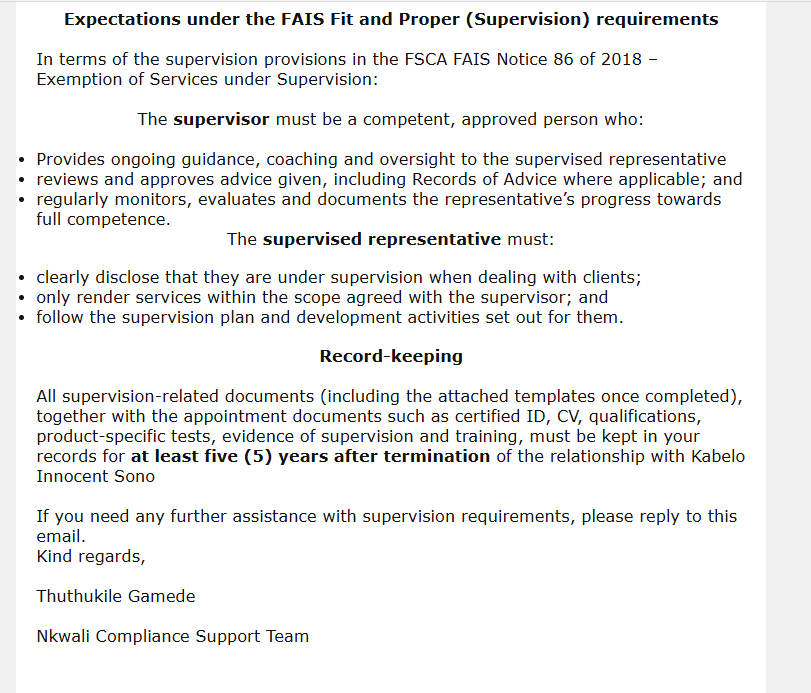
Step 5 — Understand the client email (Screenshots 2 & 3) and what it means›
Once the rep is added and all internal sections are complete, the system sends an email to the client when supervision is required. The purpose is to inform the client that the rep must operate under supervision and to provide the templates/checklists the client must keep on file.
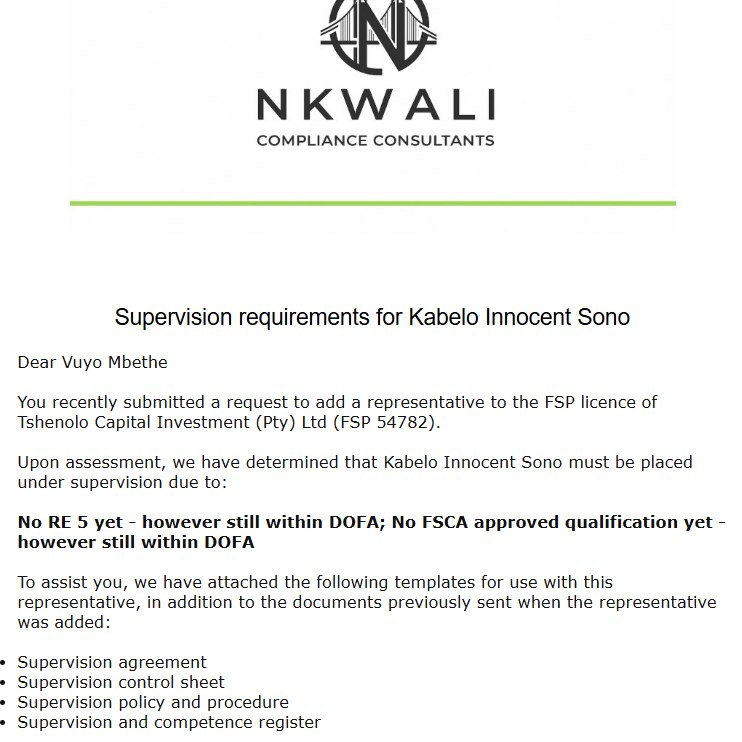
- The rep can work, but cannot operate as “fully competent” yet.
- The client must appoint supervision (a competent person/supervisor) and actively supervise the rep.
- The client must keep evidence (templates/checklists/meeting notes/assessments) for 5 years.
Step 6 — What “supervision” requires (what you must be able to explain to clients)›
Supervision is not a “paper exercise.” It is an active control to ensure the rep is guided, monitored, and assessed while still developing competence. When clients ask questions, your answers must be accurate and practical.
Core supervision components (plain language)
- Supervisor appointed: A competent person takes responsibility for supervising the rep’s services.
- Supervision agreement & plan: Define what is supervised, how often, and what evidence is kept.
- Ongoing reviews: Regular check-ins/observations, file reviews, and feedback to the rep.
- Sign-off controls: Where required, supervisor reviews and signs off work/records before advice is finalised.
- Evidence retention: Keep completed templates/checklists/meeting records/assessments for 5 years.
Say instead: “Supervision is an active process and the records prove it happened.”
Step 7 — Read more (expected standard for compliance professionals)›
As people operating in compliance, it is imperative that we understand supervision beyond the workflow. If a client queries supervision, timelines, supervision evidence, or supervisor responsibilities, you must be able to answer confidently.
Play & Learn (quick decision simulation)
Choose the best next action when the client’s JotForm selection conflicts with the competence evidence.
Scenario
The client selected “Not under supervision” on the JotForm. You retrieve the DOFA report and verify that the rep is still within the allowed timeframe, but RE5 is not yet completed. What should you do next?